

Everyone prefers a fast website. Even a few extra seconds spent loading each page can be a drag on your visitors attention. While there are a lot of factors that determine a website’s loading speed I recently ran a test of different web hosting environments on my own site.
The defacto hosting standard for many WordPress sites is a cPanel account on shared web hosting. This setup is ubiquitous and easy to manage. One alternative is a Virtual Private Server (VPS) with SSD storage. The trade off is that a VPS requires more knowledge to setup and manage, but the performance can be a big step up.
I ran a test, running this WordPress 4.0 website on reasonable (i.e. not bottom dollar) shared hosting account and a Vultr VPS with 768mb RAM and SSD storage and monitored response times.
Website Details
basic WordPress 4.0 site, without page caching. The VPS was running Apache 2.4 and the shared hosting on Litespeed HTTP.
Results
(Lower is better. Both servers are in Sydney and response time measured from the US)
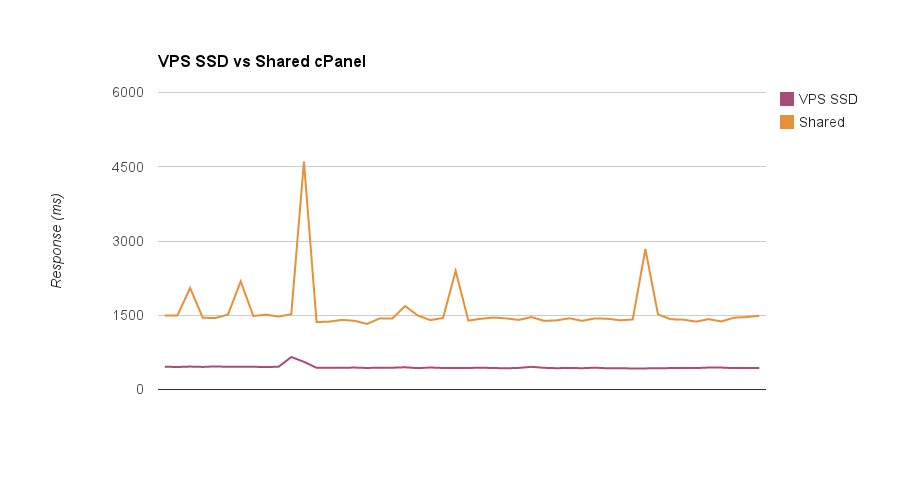
- Shared Hosting: averaged 1583 ms with the slowest measured peak at 4602 ms
- VPS SSD Hosting: averaged 448 ms with a slow peak of only 656 ms
The result was noticeably snappier pages on the VPS. The other take away is the consistency. On a shared server your response times can vary depending on what other sites on the server are doing. The VPS which has isolated resources gave far more consistent performance.
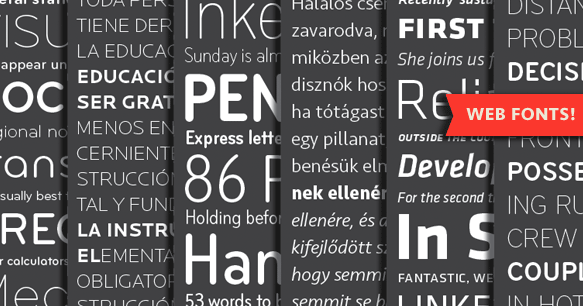 By using a combination of CSS, HTML and web fonts you can almost always reproduce the same effect that you get by displaying information with an image. Not only will your content be crawlable, but it will also be able to be marked up with metadata, meaning your awesome header graphic could also be the H1. If it were an image that wouldn’t be the case. Furthermore if you create a graphic using this method as opposed to an image, editing it is a cinch. If you want to change the text, colour, size or any other styling, you don’t have to pull the graphic back into Photoshop to change.
 Those minimalist highly visual, low word count designs might look great, but for SEO purposes they are incredibly counterproductive. Google needs content to work out what the website is about. Sure your metadata does some of the job but Google is a completionist and good copy indicates digestible information for the end user. Google’s algorithm is all about sending their users to results they can trust. If you want to retain the minimalist approach then the solution could be to hide the copy behind mouse-overs, however it may be worth questioning whether doing this pits aesthetics against usability.